
999v Crypto Deposit & Withdrawal: Easy USDT Guide 2026
If you are facing problems in depositing and withdrawing funds on 999v, you can do it by crypto. USDT is supportedon the platform, and it is often faster and simpler than local payment methods when those are slow or unavailable. This guide shows both processes step by step.
How to Deposit and Withdraw Through Crypto in 999v
Why Use Crypto on 999v?
Local payment methods like JazzCash can sometimes fail because of bank downtime, limits, or network issues. Crypto gives you another route that works at any time. Deposits made with USDT also get extra bonus rewards. The platform shows a +3-5% bonus on the USDT payment method.
Supported Crypto Options
999v currently supports USDT (Tether) on two networks:
| Network | Deposit Bonus |
|---|---|
| TRC20 (Tron) | 5% |
| BEP20 (BNB Smart Chain) | 3% |
TRC20 gives the higher bonus, and its transfer fees are usually low, so most users choose it.
How to Deposit Through Crypto
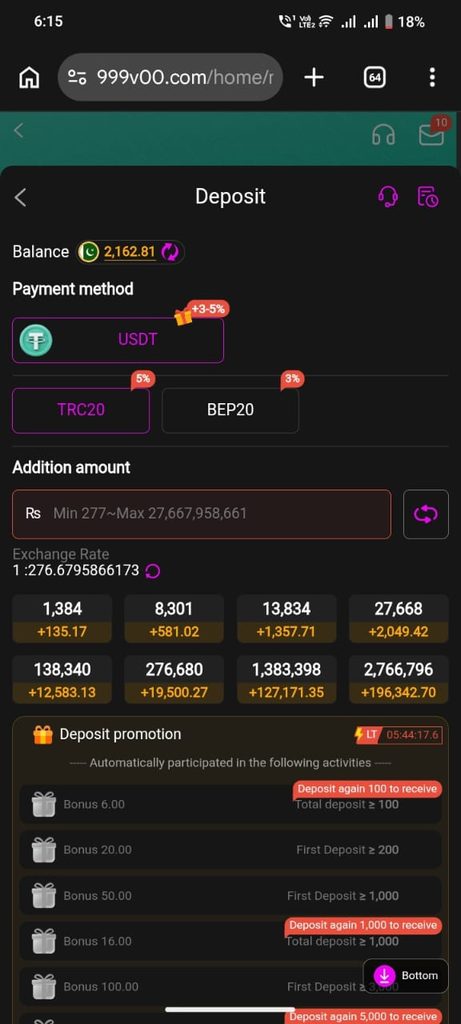
Step 1: Open the Deposit page. Log in to your 999v account and tap Deposit. Your current balance is shown at the top.
Step 2: Select the payment method. Choose USDT under Payment Method.
Step 3: Choose the network. Select TRC20 (5% bonus) or BEP20 (3% bonus). Use the same network that your wallet or exchange will send from.
Step 4: Enter the amount. Type the amount in PKR in the “Addition amount” box, or tap one of the quick amounts. The minimum deposit is Rs 277. The exchange rate is shown below the box and is about 1 USDT = Rs 276.68. It changes, so check the live rate before you pay.
Step 5: Check the deposit promotions. Bonuses are applied automatically when your deposit meets the conditions, with no code needed. For example, a total deposit of Rs 100 or more, a first deposit of Rs 200 or more, and a first deposit of Rs 1,000 or more each unlock a different bonus. Scroll down to the Deposit promotion section to see all tiers and the countdown timer.
Step 6: Complete the transfer. Confirm the deposit and send the USDT from your wallet or exchange to the address shown. Your balance updates after the network confirms the transaction.
How to Withdraw Through Crypto
Before you can withdraw to crypto, you must add your wallet as a receiving account.
Step 1: Go to the withdrawal section. Open the Withdrawal area and select the Receiving account tab. You can save up to 30 receiving accounts.
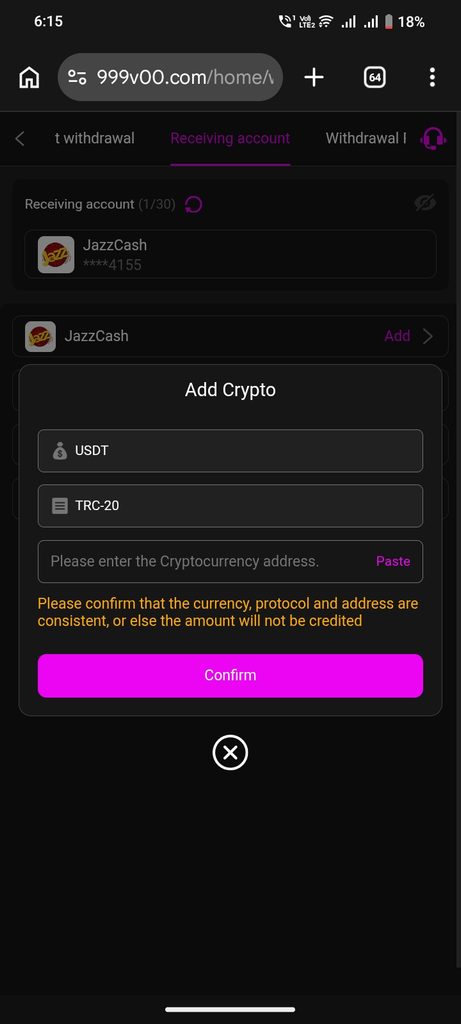
Step 2: Add a crypto account. Tap Add and choose the crypto option. The Add Crypto window will open.
Step 3: Select the currency and protocol. Choose USDT as the currency and TRC-20 as the protocol.
Step 4: Enter your wallet address. Paste your USDT (TRC-20) address into the address box. Use the Paste button to avoid typing mistakes.
Step 5: Confirm. Double-check everything, then tap Confirm to save the account.
Step 6: Request the withdrawal. Go back to the withdrawal page, select your saved crypto account, enter the amount, and submit.
Important Warnings
The platform itself warns that the currency, protocol, and address must all match, or the amount will not be credited. Keep these points in mind:
- Match the network. A TRC20 address only works with TRC20. Sending on BEP20 to a TRC20 address can lose your funds permanently.
- Copy-paste the address. Never type it by hand. One wrong character means a lost transfer.
- Send a test amount first if you are using a new wallet.
- Never share your wallet seed phrase or private key with anyone, including anyone claiming to be support.
- Check the exchange rate before depositing, since the PKR value depends on the live USDT rate.
Quick Tips
- Use TRC20 for the highest deposit bonus (5%).
- Keep a little extra for network fees in your wallet.
- If a deposit does not show up after the network confirms it, contact customer support using the headset icon on the Deposit page, and keep your transaction hash (TXID) ready.
Final Words
Crypto is a reliable backup when normal payment methods give you trouble on 999v. Choose the right network, double-check your address, and the whole process takes only a few minutes.